
Steps
- Open your website in editing mode. You sign in without a password, using a link from an email.
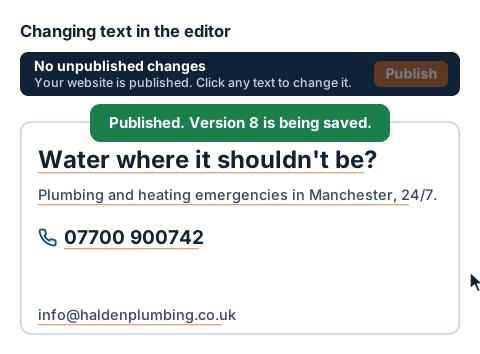
- Hover over the text you want to change. Anything you can edit has a thin orange underline, and the cursor turns into a pencil. The What's editable button on the bar shows all the editable places at once.
- Click the text. It gets an orange outline and is selected in full, so you can type over it straight away. It works the same for a heading, a paragraph, a phone number and an email address.
- Confirm with the Enter key or click somewhere else. In longer text, Enter starts a new line, so confirm by clicking somewhere else. If you change your mind, the Esc key brings back the original text.
- The editor checks phone numbers and email addresses. A phone number has to be complete. You don't need to type spaces: the number is split up automatically when you confirm it. If the format is wrong, the field turns red and a message appears below it, for example Enter the full number, for example 07700 900123. Correct it and confirm again.
- Each confirmed change is added to the bar at the top: 1 unpublished change, 2 unpublished changes. Only you can see them. The public website doesn't change yet.
- When everything is as it should be, click Publish on the bar. Only then does the public website change.